v2.0.1 · 签到与同步修复 v2.0.1 · Check-in and sync fixes

把 AI 用量
装进菜单栏
Your AI usage,
right in the menu bar

CCBar 实时汇总 Claude Code、Codex、GLM 与 Trae 的 token、积分和费用,还替你做 Trae 每日签到。数据留在本地,抬眼就能看到今天用了多少。

CCBar brings Claude Code, Codex, GLM and Trae usage together — tokens, credits and cost — and checks in to Trae for you each day. Everything stays on your machine.
  • macOS 13+
  • Apple Silicon & IntelApple Silicon & Intel
  • MIT 许可MIT license
  • 无需账号No account
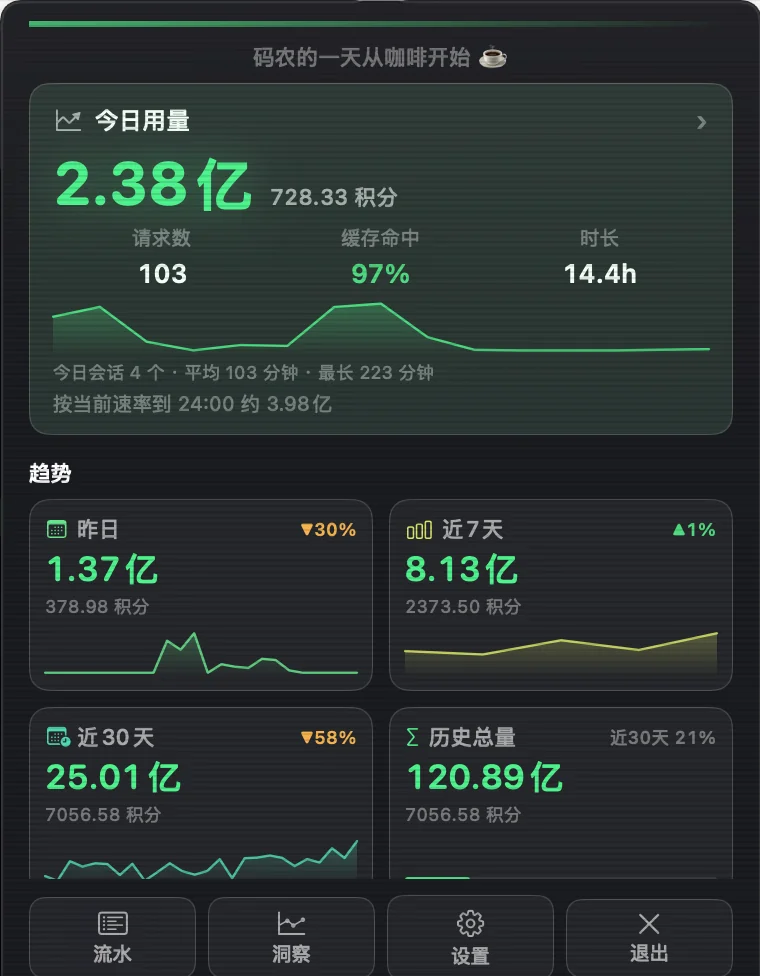
CCBar 弹窗面板:今日用量、趋势和快捷入口
实时刷新 · 30s Live · 30s 本地 SQLite · 不上传 Local SQLite · No upload
界面示意 · 数据来自本地统计 Interface preview · data from a local store
汇聚Works with cc-switch ZCode Trae 所有源库只读,历史自动补账Read-only sources, history synced locally
功能FEATURES

一眼看清今天的用量A clear view of today

从菜单栏的一个数字,到七页洞察中心。所有视图共用同一份本地统计。

From a single number in the menu bar to a seven-page insights center, every view reads from the same local store.

菜单栏实时数字Live in the menu bar

今日 token 总量常驻标题栏,按用量阈值变色。默认每 30 秒刷新,也可自己调。

Today's token total stays in the title bar and changes color with usage. Refreshes every 30 seconds by default.

30s refresh

多源聚合Multi-source by design

cc-switch、ZCode、Trae 统一口径。每个源都能独立启停、自定义数据库路径。

cc-switch, ZCode and Trae in one place. Enable each source independently and point it at your own database.

cc-switch · ZCode · Trae

积分与余额Credits and balance

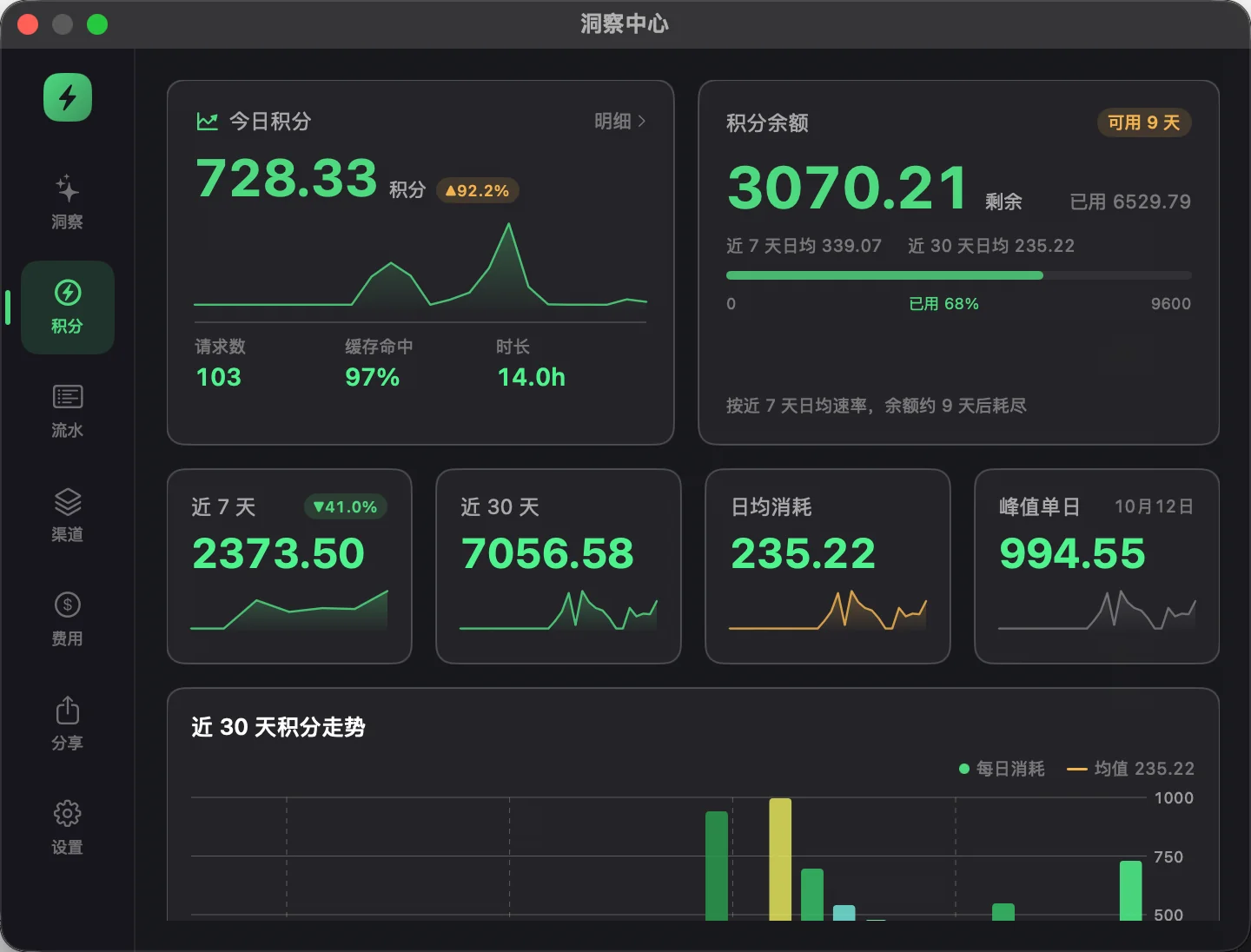
Trae 积分、7 / 30 / 90 天趋势、余额可用天数,还有月度预算进度。

Trae credits, 7 / 30 / 90-day trends, projected days remaining and a monthly budget line.

Trae credits

七页洞察中心Seven-page insights

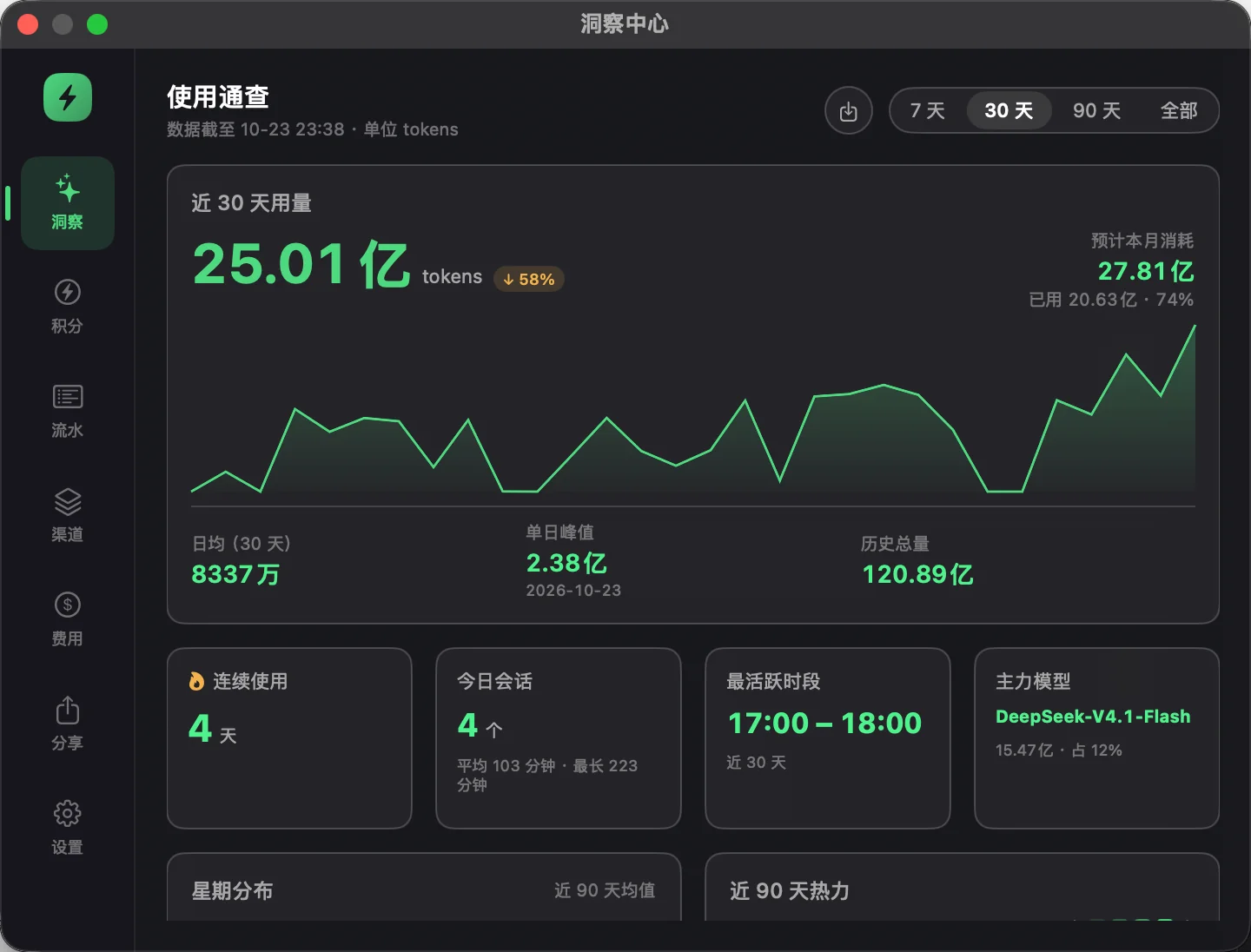
签到、洞察、积分、流水、渠道、费用、设置。热力图、模型编年史、积分账本和预算都能在这里找到。

Check-in, insights, credits, timeline, channels, cost and settings — with heatmaps, a model chronicle, a credits ledger and budgets.

Insights

Trae 每日签到Daily Trae check-in

从本机 Trae 客户端自动发现账号,按账号分别签到。默认 9 点起在随机分钟签到,起始小时可改,也能随时「立即签到」;奖励逐笔记入积分账本。

Finds your Trae accounts automatically and checks each one in daily — from 9:00 by default at a random minute, with a configurable start hour, or on demand. Every reward lands in the credits ledger.

Auto · +credits

本地优先Local-first, private

统计库是本地 SQLite,外部源库全程只读。没有云端账号,也不会上传你的用量。

A local SQLite store, source databases opened read-only. No cloud account and no usage upload.

No cloud
亮点 · v2.0.1 HIGHLIGHT · v2.0.1

Trae 签到,
每天替你签
Trae check-in,
handled daily

到点自动签到,每个 Trae 账号各自判断、各自领取。凭据从本机 Trae 客户端自动发现,奖励逐笔记进积分账本。

Checks each Trae account at the scheduled hour, claims its reward, and records every credit in the ledger — with credentials discovered from the local Trae client.
9:00 默认起始时间Default start hour
00–23 任意整点可调Any hour
1h 失败重试间隔Retry backoff
  • 不用粘贴 sessionidNo sessionid paste 从本机 Trae 客户端读取登录凭据,JWT 自动续签;凭据和签到记录都留在本机。 CCBar reads the local Trae client's credentials, renews the JWT, and keeps both credentials and records on your Mac.
  • 账号之间互不影响Accounts stay independent 每个账号单独判断今日状态、单独领取;一个失败不会拖住另一个。 Each account is checked and claimed on its own, so one failure never blocks the other.
  • 签到积分有账可查Rewards, in the ledger 奖励逐笔记入积分账本,和余额、消耗、净额一起看;最近 50 条签到记录随时可查。 Every reward is recorded next to balance, spend and net credits; the latest 50 check-ins stay available.
下载 macOS 版Download for macOS
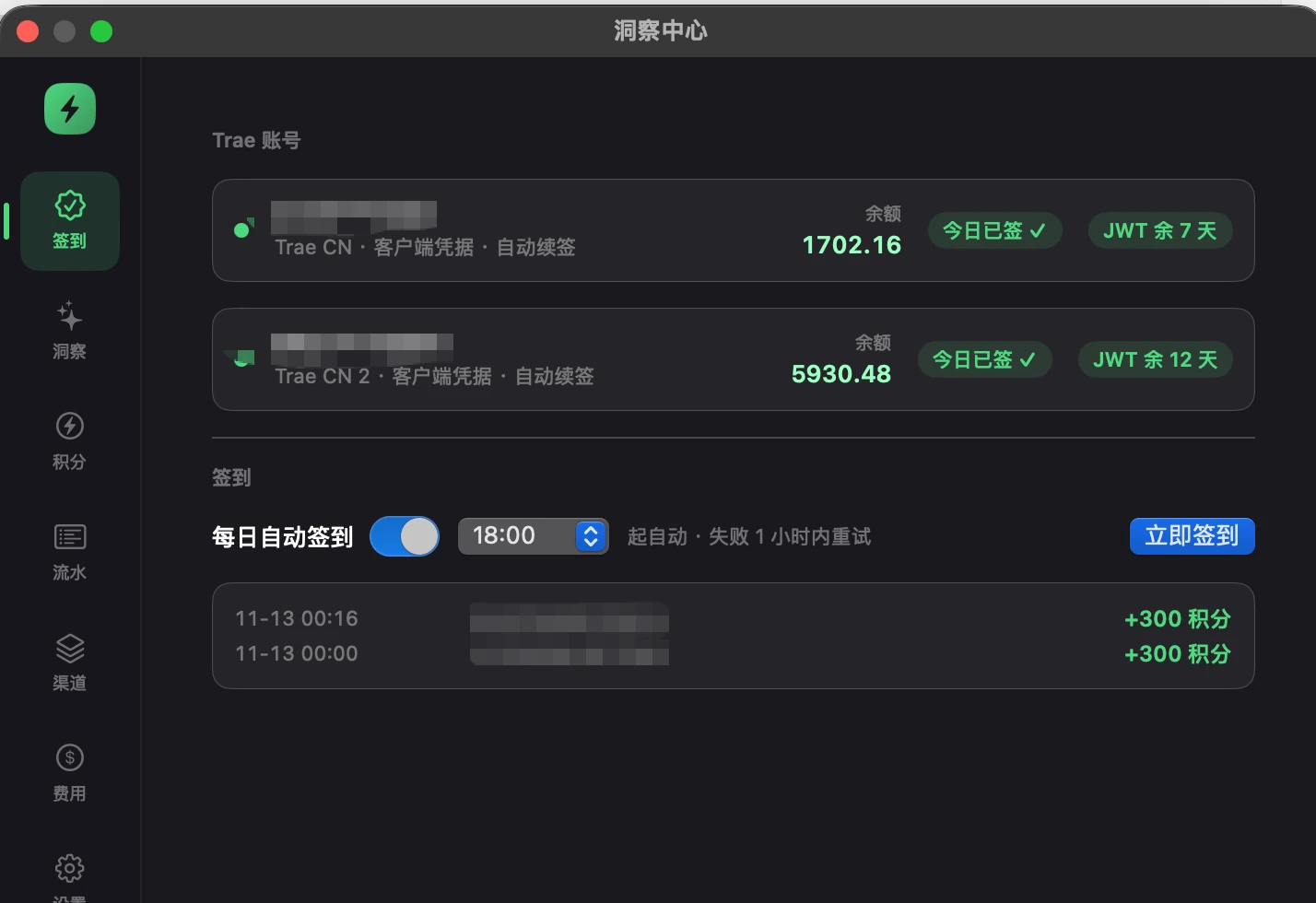
CCBar 签到页:Trae 账号今日已签、自动签到开关与积分记录
签到页:账号状态、每日自动签到开关与最近记录。界面示意,数据来自本机。 Check-in page: account status, the daily switch and recent records. Interface preview from a local store.
30 秒30 SECONDS

从一眼,到完整复盘From a glance to a full review

菜单栏看今日总量,弹窗看当天细节,洞察中心看趋势、模型和积分。同一个本地统计库,三种看法。

Today's total in the menu bar, the day's details in the popover, and trends, models and credits in the insights center — all from the same local store.
CCBar 操作演示:弹窗、洞察中心与积分页
演示为界面示意,数据来自本地统计库。 Interface preview from a local usage store.
界面SCREENS

从一眼,到复盘From a glance to a review

日常看弹窗,周末看洞察。需要较真的时候,还有逐笔流水和费用榜。

Check the popover during the day, review insights on the weekend, and dig into the timeline when the numbers matter.
CCBar 弹窗面板截图
今日卡片、模型分布、近 7 / 30 天趋势,以及按当前速率的用量预测。 Today's card, model mix, 7 / 30-day trends and a pace-based projection.
数据源DATA SOURCES

三个来源,一个口径Three sources, one view

CCBar 不复制源库,也不修改源库。历史每天补账进本地,今日实时读取,再在同一个视图里汇总。

CCBar never copies or modifies your source databases. History is synced locally each day, today is read live, and both meet in one view.

内置Built in

Claude Code · Codex · OpenCode

读取 cc-switch 的代理请求日志,按记录里的单价折算费用。Claude、Codex 和其他走代理的应用都能一起统计。

Reads cc-switch proxy request logs and uses the recorded unit price for cost — Claude, Codex and other apps behind the proxy.

内置Built in

GLM

对齐 ZCode 官方统计口径:input + output,缓存命中不计入,方便直接和官方界面核对。

Matches ZCode's official accounting: input + output, with cache hits excluded, so numbers line up with the app.

内置Built in

Trae · credits

通过官方 HTTP API 拉取会话用量与积分,JWT 自动续签;优先自动发现本机 Trae 客户端凭据,也可手动粘贴 sessionid。

Pulls usage and credits through the official HTTP API with automatic JWT renewal, discovering credentials from the local Trae client first — manual sessionid still works.

数据流Pipeline 只读源库 / APIRead-only sources 每日补账Daily sync usage_all 菜单栏 / 洞察中心Menu bar / Insights
细节THE DETAILS

为长期使用而设计Built for the long run

每日自动备份Daily backups

统计库每天自动备份,滚动保留 7 份,也能手动备份。

The local database is backed up daily with seven rolling copies, plus manual backup.

CSV 幂等导入导出Idempotent CSV

按主键去重,重复导入零新增,换机或多机合并都不重不漏。

Primary-key dedupe makes repeat imports safe, so merging machines never double-counts.

6 套主题 + 主题包Six themes + packs

内置配色含 CRT 终端风格,JSON 主题包可导入导出,方便分享。

Six built-in themes, including a CRT terminal look, with importable JSON theme packs.

中文 / English中文 / English

界面双语,可跟随系统切换。菜单栏、弹窗和洞察中心保持一致。

A bilingual interface that can follow the system, across the bar, popover and insights.

预警与里程碑Alerts and milestones

超过阈值或每累计 N 万 token 发系统通知,预算超支也能提前知道。

System notifications for usage thresholds and token milestones, plus budget warnings.

菜单栏像素猫Pixel cat companion

没用量时睡觉,用量越大跑得越快。也可以换回安静的闪电图标。

A pixel cat that naps when idle and runs faster with usage. Switch back to the bolt icon anytime.

下载DOWNLOAD

装进菜单栏,
今天就开始
Put it in your menu bar

免费、无需注册。macOS 下载 DMG 拖进 Applications;Windows 下载单文件 exe 直接运行。

Free and no sign-up. On macOS, drag the DMG into Applications; on Windows, just run the single executable.

安装包托管在 GitHub Releases,Windows 版为单文件 exe,跟随最新发布。 Installers live on GitHub Releases; the Windows build is a single exe tracking the latest release.

版本Versionv2.0.1
系统SystemmacOS 13+
架构ArchitectureUniversal
许可LicenseMIT
安装只要三步Three steps to install
  1. 1打开下载的 DMGOpen the downloaded DMG
  2. 2把 CCBar 拖进 ApplicationsDrag CCBar into Applications
  3. 3启动 CCBar,在设置里选择数据源Launch it and pick your sources in Settings

当前安装包未做 Apple 公证。首次打开若提示“无法验证开发者”,请右键应用选择“打开”,或在终端执行 xattr -dr com.apple.quarantine /Applications/CCBar.app。

The build is not notarized yet. If macOS blocks the first launch, right-click the app and choose Open, or run xattr -dr com.apple.quarantine /Applications/CCBar.app.

Windows 托盘版Windows tray build Windows 10+ · v2.0.0 · 单文件 exesingle exe
路线图ROADMAP

下一步:本地 CLI
与 JSON API
Next: a local CLI
and JSON API

规划中Planned

计划在 v2.1.0 提供 ccbar 命令行和本地 Unix socket API,让状态栏工具、脚本和 Raycast 直接读取同一份统计。只读、无网络端口,数字与 UI 完全一致。

Planned for v2.1.0: a ccbar CLI and a local Unix socket API, so status bars, scripts and Raycast can read the same numbers as the app. Read-only, no network port, no second accounting layer.

  • ccbar stats today --json 输出今日汇总ccbar stats today --json for today's totals
  • 模型、数据源、周期查询Model, source and period queries
  • ccbar:// 直接打开洞察页ccbar:// links to open insights pages
  • app 未运行时自动拉起Auto-launch when the app is not running

CLI 与本地 API 尚未随 v2.0.1 发布,以上为规划内容。The CLI and local API are not part of v2.0.1 yet; the items above are planned.

ccbar — zsh
$ ccbar stats today --json
{
  "period": "today",
  "requests": 103,
  "tokens": {
    "input": 184000000,
    "output": 42000000,
    "cache_read": 12000000,
    "total": 238000000
  },
  "credits": 728.33,
  "cost_usd": 12.34
}
更新记录CHANGELOG

一直在打磨Always being sharpened

v2.0.1 2026-11-13 当前版本Current

签到更稳,用量不再停更Steadier check-in, no stalled usage

  • 签到防重复:今日已签的账号彻底跳过,按钮变为「今日已签到」并置灰,不会再多领一次。No repeat check-ins: accounts already checked in today are skipped entirely, and the button reads Checked in today and stays disabled.
  • 签到时间改为起始小时后按账号随机分钟,跨重启保持稳定,不再整点准点签。Check-in now fires at a stable per-account random minute after the start hour, instead of exactly on the hour, across restarts.
  • 新增签到互斥与领取前复核水位;服务端返回已签时只补水位,不重复记录奖励。A new check-in mutex and a pre-claim watermark re-check mean an already-claimed response only advances the watermark, never double-recording the reward.
  • 修复登出其中一个 Trae 客户端后,唯一活跃账号被两个槽位都跳过、导致用量停更的问题。Fixes usage stalling after signing out of one Trae client, when both account slots skipped the only remaining active account.
v2.0.0 2026-11-13

Trae 每日签到,回来了Trae daily check-in is back

  • 从本机 Trae 客户端自动发现账号凭据,每个 Trae 账号独立判断今日状态并领取奖励,不用再手动粘贴 sessionid。Discovers account credentials from the local Trae client, then checks each Trae account independently and claims its reward — no manual sessionid required.
  • 默认每天 9:00 自动签到,可在 00:00–23:00 之间调整;也能在洞察 → 签到页随时「立即签到」。失败后 1 小时内不重复重试。Runs at 9:00 by default, adjustable to any hour from 00:00 to 23:00, and you can hit Check in now under Insights → Check-in at any time. A failed attempt waits an hour before retrying.
  • 签到奖励逐笔记入积分账本,和余额、消耗、净额一起看;双账号各自签到、各自记账,记录保留最近 50 条。Rewards land in the credits ledger next to balance, spend and net credits. Two Trae accounts check in and keep records separately, with the latest 50 entries kept.
  • 同一版本还带来:流水页区间视图与单日小时折叠、积分账本四口径、权益包到期提醒。Also in this release: date ranges and single-day hourly folding in the timeline, four-way credits accounting and expiry reminders for credit packs.
  • Windows 版同步发布 v2.0.0:签到页、积分账本和流水 v2 与 macOS 对齐。The Windows build reaches v2.0.0 in step, with the check-in page, credits ledger and timeline v2 matching macOS.
v1.9.24 2026-10-28

多账号积分,分开看Credits, per account

  • usage_log 新增 account 归属列;今日积分、余额和流水按 Trae 账号拆分展示,历史记录保持未归属。A new account column in usage_log splits today's credits, balances and timeline by Trae account; older rows stay unassigned.
  • 弹窗今日卡页脚改为多账号积分拆分;余额卡与流水页同步标注账号。The popover footer now breaks credits down per account, and the balance card and timeline label each account.
  • 修复两个 Trae 账号共用节流时钟导致第二个账号永不增量同步;空模型名统一归为 unknown。Windows 端同步支持多账号展示。Fixes the shared sync throttle that kept the second Trae account from incrementally syncing, normalizes empty model names to unknown, and brings the same multi-account view to Windows.
v1.9.21 2026-10-25

凭据步骤就在设置里Credential steps, right in Settings

  • Trae 凭据输入框旁新增「如何获取?」:登录 trae.cn 后从开发者工具 Cookies 复制 sessionid,四步照做即可。A new “How to get it?” next to the Trae credential field: sign in at trae.cn, copy sessionid from DevTools cookies, follow four steps.
  • macOS 用 ⌥⌘I 打开开发者工具,Windows 用 F12;帮助里也说明整段 Cookie 与 X-Cloudide-Session=… 的用法。Open DevTools with ⌥⌘I on macOS or F12 on Windows; the help also covers whole cookies and X-Cloudide-Session=….
  • macOS 与 Windows 同步更新到 v1.9.21。macOS and Windows are updated together at v1.9.21.
v1.9.20 2026-10-25

Trae 凭据更好填Easier Trae credentials

  • 设置里可粘贴整段 Cookie、带 sessionid= 前缀的值或 X-Cloudide-Session=…;整段 Cookie 会自动取出 sessionid。Paste a whole cookie, a sessionid= value or an X-Cloudide-Session=…; the app extracts sessionid from whole cookies automatically.
  • 提供 X-Cloudide-Session 时跳过首次登录换签,凭据约 14 天有效;登录过期提示同步更新。Supplying X-Cloudide-Session skips the first login exchange and lasts about 14 days; the expired-session hint now mentions both options.
  • 仅改变粘贴格式不会清空该账号的本地历史;Windows 版本号同步对齐 v1.9.20。Changing only the paste format no longer clears that account's local history, and the Windows build is versioned in step at v1.9.20.
v1.9.19 2026-10-24

积分全量落地,Trae 同步更快Credits everywhere, faster Trae sync

  • 详情窗口全量积分列:7 天 / 30 天 / 模型 / 每小时 / 历史总量 / Top 会话的数据行与合计都含积分。Credits in every detail window: 7-day, 30-day, models, hourly, all-time and top sessions all show and total credits.
  • Trae 同步改为数据水位增量分页,整页更旧就提前结束;失败或截断不推进水位。Trae sync now uses a data watermark and stops pagination early, without advancing on failures or truncation.
  • 修复今日会话统计被 800 行流水截断,精简取数链路,积分余额条按剩余额度显示绿色。Fixes today's session count being cut off at 800 rows, streamlines queries and makes the remaining-credits bar green.
v1.9.12 2026-10-23

洞察中心与设置页改版Insights and settings redesign

  • 导航重排、设置内嵌、积分页重做,卡片配色与等高修正。Reordered navigation, embedded settings, a rebuilt credits page and cleaner card alignment.
  • 新增净输入 Top 会话窗口;弹窗对齐 Windows 版并缓存每日趋势。New top-sessions window, popover aligned with the Windows build and cached daily trends.
v1.8.3 2026-10-08

Trae 每日自动签到Daily Trae check-in

  • 复用 JWT 自愈链自动领取签到积分,失败按小时重试,水位幂等一天一次。Automatically claims daily check-in credits through the JWT refresh chain, with hourly retries and a once-a-day watermark.
  • 修复 En 语言环境下的词典 trap 与日期相关测试。Fixes a localization dictionary trap in English and date-sensitive tests.
常见问题FAQ

你可能想知道Good to know

我的数据会上传吗?Does my data leave my Mac?

不会。CCBar 的统计库在本地 SQLite,外部数据源只读打开。应用没有云端账号,也不会上传用量、凭证或会话内容。

No. The store is a local SQLite database and source databases are opened read-only. There is no cloud account, and usage, credentials and session content are never uploaded.

自动签到是怎么工作的?How does auto check-in work?

本机需要装有 Trae 客户端并保持登录。CCBar 读取客户端已有的登录凭据,在本地调用官方签到接口;凭据和签到记录都只存在本机。凭据过期时,重新登录一次 Trae 客户端即可。

Trae must be installed and signed in on the same Mac. CCBar reads the client's existing credentials and calls the official check-in endpoint locally; credentials and check-in records stay on your machine. If they expire, just sign in to Trae again.

首次打开提示“无法验证开发者”怎么办?macOS says it cannot verify the developer. What now?

当前构建使用 ad-hoc 签名,尚未做 Apple 公证。右键点击 CCBar 选择“打开”,或到“系统设置 → 隐私与安全性”里允许本次打开。之后可正常启动。

The current build is ad-hoc signed and not notarized yet. Right-click CCBar and choose Open, or allow it once in System Settings → Privacy & Security. Subsequent launches work normally.

会和 cc-switch / ZCode 冲突吗?Will it conflict with cc-switch or ZCode?

不会。CCBar 只读取它们的数据库,不会写入、迁移或删除源数据;卸载 CCBar 也不影响原应用。

No. CCBar only reads their databases. It never writes, migrates or deletes source data, and removing CCBar leaves the original apps untouched.

支持 Windows 吗?Is there a Windows version?

有。可直接下载单文件 ccBar.exe,功能和界面与 macOS 版保持相近。

Yes. Download the single-file ccBar.exe directly; its feature set closely follows the macOS build.

菜单栏数字和平台账单对不上?Why doesn't the menu bar match my provider bill?

不同平台的口径不一样。CCBar 已按各源官方口径处理:ZCode 不含缓存命中,Trae 的 input 折算为净输入,cc-switch 按记录的单价估算费用。账单还可能包含套餐、折扣或未记录请求。

Providers count differently. CCBar follows each source's own accounting: ZCode excludes cache hits, Trae's input is converted to net input, and cc-switch cost uses recorded prices. Bills may also include plans, discounts or unlogged requests.

CLI 什么时候能用?When will the CLI be available?

本地 CLI 与 JSON API 已进入 v2.1.0 规划,设计目标是只读、无端口、与 UI 同口径。发布后会更新本页。

The local CLI and JSON API are planned for v2.1.0 — read-only, no network port and the same numbers as the UI. This page will be updated when it ships.